COMPONENT
Mount
A picture with its label under it, on a board. The museum label: a photograph, a small tracked line, a sentence, then the facts in the quietest ink the system has.
A wall of them
Four type steps and every one is optional — the third card here has no title at all and is still a card.

Carrara, cut thin
The veining runs the length of the slab, so a crop is a decision about which line you keep.

Yesterday, rolled
No title is fine. No kicker is fine. The ladder is four type steps rather than a template.

This one has no title at all, and the card is still a card.
<!-- Four type steps under a picture, and every one of them is optional. The
     board is the mount's; the picture is a `frame` with its own hairline
     dropped, because two hairlines meeting is a two-pixel line. -->
<div class="mount-wall" style="--mount-min:200px">
  <figure class="mount">
    <div class="frame frame-bare">
      <img src="/scenery/marble.webp" alt="White marble with grey veining" loading="lazy" decoding="async" />
    </div>
    <figcaption class="mount-caption">
      <span class="mount-kicker">MARBLE</span>
      <h3 class="mount-title">Carrara, cut thin</h3>
      <p class="mount-note">The veining runs the length of the slab, so a crop is a decision about which line you keep.</p>
      <p class="mount-meta">Flat Lay Photos · CC0</p>
    </figcaption>
  </figure>

  <figure class="mount">
    <div class="frame frame-bare">
      <img src="/scenery/newsprint.webp" alt="Rolled newspapers" loading="lazy" decoding="async" />
    </div>
    <figcaption class="mount-caption">
      <span class="mount-kicker">NEWSPRINT</span>
      <h3 class="mount-title">Yesterday, rolled</h3>
      <p class="mount-note">No title is fine. No kicker is fine. The ladder is four type steps rather than a template.</p>
      <p class="mount-meta">Rawpixel · public domain</p>
    </figcaption>
  </figure>

  <figure class="mount">
    <div class="frame frame-bare">
      <img src="/scenery/curl.webp" alt="Curled peach paper" loading="lazy" decoding="async" />
    </div>
    <figcaption class="mount-caption">
      <span class="mount-kicker">CURL</span>
      <p class="mount-note">This one has no title at all, and the card is still a card.</p>
    </figcaption>
  </figure>
</div>
Press the picture, not the card
The overlay opens a dialog and the credit line underneath stays reachable. Try Escape, and try tabbing to it. There is no script anywhere in this.

Press the picture. Escape closes it, and so does the space beside it.

Tab to it too — the overlay takes the same focus ring every control here does.
<!-- The picture is the target and the caption is not, so the credit underneath
     stays reachable. `frame-link` is the overlay; on a button it opens the
     dialog, and there is no script anywhere in this. -->
<div class="mount-wall" style="--mount-min:220px">
  <figure class="mount">
    <div class="frame frame-bare">
      <img src="/scenery/ink.webp" alt="" loading="lazy" decoding="async" />
      <button class="frame-link" command="show-modal" commandfor="mount-ink" aria-label="Open: coral ink in water"></button>
    </div>
    <figcaption class="mount-caption">
      <span class="mount-kicker">INK</span>
      <p class="mount-note">Press the picture. Escape closes it, and so does the space beside it.</p>
      <p class="mount-meta">Matthew Henry · <a href="https://stocksnap.io/" rel="noreferrer">StockSnap</a></p>
    </figcaption>
  </figure>

  <figure class="mount">
    <div class="frame frame-bare">
      <img src="/scenery/silk.webp" alt="" loading="lazy" decoding="async" />
      <button class="frame-link" command="show-modal" commandfor="mount-silk" aria-label="Open: black satin, folded"></button>
    </div>
    <figcaption class="mount-caption">
      <span class="mount-kicker">SILK</span>
      <p class="mount-note">Tab to it too — the overlay takes the same focus ring every control here does.</p>
      <p class="mount-meta">HD Wallpapers · <a href="https://stocksnap.io/" rel="noreferrer">StockSnap</a></p>
    </figcaption>
  </figure>
</div>

<dialog class="modal" id="mount-ink">
  <div class="modal-box">
    <div class="modal-head">
      <h2 class="modal-title">Coral ink in water</h2>
      <button class="modal-close" command="close" commandfor="mount-ink" aria-label="Close"></button>
    </div>
    <div class="modal-body modal-media">
      <img src="/scenery/ink.webp" alt="Coral ink opening in water against pale grey" loading="lazy" />
    </div>
  </div>
  <form method="dialog" class="modal-veil"><button aria-label="Close"></button></form>
</dialog>

<dialog class="modal" id="mount-silk">
  <div class="modal-box">
    <div class="modal-head">
      <h2 class="modal-title">Black satin, folded</h2>
      <button class="modal-close" command="close" commandfor="mount-silk" aria-label="Close"></button>
    </div>
    <div class="modal-body modal-media">
      <img src="/scenery/silk.webp" alt="Black satin in soft folds" loading="lazy" />
    </div>
  </div>
  <form method="dialog" class="modal-veil"><button aria-label="Close"></button></form>
</dialog>
The board takes a role, and the picture takes a shape
Two knobs, two independent decisions. Neither the mount nor the stencil knows the other exists.

A stencil on a bare frame is the one place it cuts cleanly — there is no hairline left for the shape to slice through.
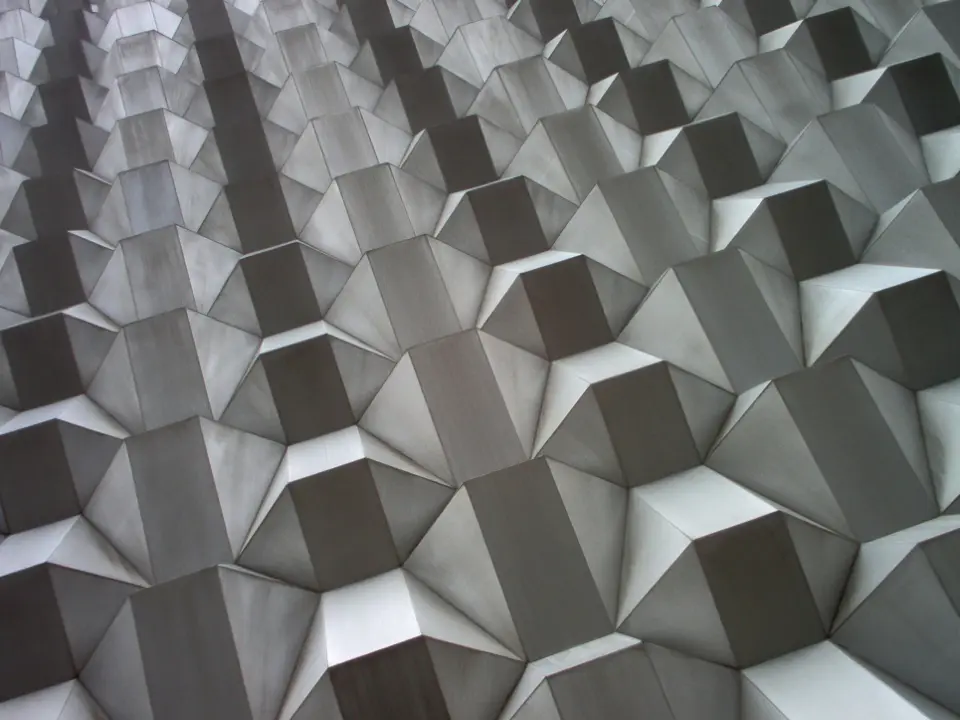
Same board, same picture slot, a different shape. Neither the mount nor the stencil knows about the other.
<!-- The board takes a ROLE, never a colour: on a band that is already sunk, a
     mount asks for the ground instead and reads as a panel again. -->
<div class="mount-wall" style="--mount-min:220px">
  <figure class="mount" style="--mount-surface:var(--ds-ground)">
    <div class="frame frame-bare stencil-arch">
      <img src="/scenery/sprig.webp" alt="One leaf in a glass, on white" loading="lazy" decoding="async" />
    </div>
    <figcaption class="mount-caption">
      <span class="mount-kicker">ARCHED</span>
      <p class="mount-note">A stencil on a bare frame is the one place it cuts cleanly — there is no hairline left for the shape to slice through.</p>
    </figcaption>
  </figure>

  <figure class="mount" style="--mount-surface:var(--ds-ground)">
    <div class="frame frame-bare stencil-notch">
      <img src="/scenery/facets.webp" alt="Folded metal panels on a facade" loading="lazy" decoding="async" />
    </div>
    <figcaption class="mount-caption">
      <span class="mount-kicker">NOTCHED</span>
      <p class="mount-note">Same board, same picture slot, a different shape. Neither the mount nor the stencil knows about the other.</p>
    </figcaption>
  </figure>
</div>
A label, or a caption
Same component, two gutters. --mount-pad takes --ds-pad-card-tight when the mount is mostly picture — a screen capture with a line under it, rather than a museum label. At page width the card step lands on its 38px ceiling, which around a screenshot reads as a mat somebody has framed it in.
The gutter a card wants when the words are the point.
The gutter a caption wants when the picture is.
<!-- Two boards, one knob. The left one takes the card step the library ships;
     the right one names `--ds-pad-card-tight`, which is the theme's word for
     the same gutter said quietly. A caller names the token, never a number. -->
<div class="mount-wall" style="--mount-min:260px">
  <figure class="mount">
    <div class="frame frame-bare">
      <img src="/scenery/facets.webp" alt="Folded metal panels on a facade" loading="lazy" decoding="async" />
    </div>
    <figcaption class="mount-caption">
      <span class="mount-kicker">CARD STEP</span>
      <p class="mount-note">The gutter a card wants when the words are the point.</p>
    </figcaption>
  </figure>

  <figure class="mount" style="--mount-pad:var(--ds-pad-card-tight)">
    <div class="frame frame-bare">
      <img src="/scenery/sprig.webp" alt="One leaf in a glass, on white" loading="lazy" decoding="async" />
    </div>
    <figcaption class="mount-caption">
      <span class="mount-kicker">TIGHT STEP</span>
      <p class="mount-note">The gutter a caption wants when the picture is.</p>
    </figcaption>
  </figure>
</div>
Reference
Read from components/mount.css when this page was built, so it cannot fall behind the stylesheet.
.mount.mount-caption.mount-kicker.mount-title.mount-note.mount-meta.mount-wall--mount-surface — falls back to --ds-sunk--mount-pad — falls back to --ds-pad-card--mount-min — falls back to --ds-cell-min--mount-gap — falls back to --ds-gap--ds-accent--ds-font-body--ds-font-display--ds-hairline--ds-ink--ds-ink-faint--ds-ink-soft--ds-radius-frame--ds-rule--ds-text-h3--ds-text-label--ds-text-meta--ds-text-small--ds-track-meta--ds-track-snug--ds-weight-displayNotes
A mount owns two things: the board, and the ladder of words under it. That is the whole component. The picture is a frame, the shape on it is a stencil, and the window it opens is a modal — none of which this file mentions.
There is deliberately no mount-media. Writing the ratio, the crop and the block sizing here would be a third spelling of a picture box — frame holds one in the flow and scene-media holds one behind content — and a third would drift from both the first week nobody looked.
The board draws a hairline and so does a frame. Two hairlines meeting is a two-pixel line, which is the one thing this design never has — and a mount cannot simply reach in and silence the frame's, because a frame is a component and the cascade puts components last on purpose.
So the answer is the system's own: ask for a variant. frame-bare is one declaration, it lives in frame.css where the decision belongs, and it is useful anywhere a container already draws the outline. It drops the border and leaves the corner alone — a flush frame in a rounded box wants the box's top corners and square feet, which is a fact about the container rather than about the picture.
A hairline grid refuses a gap by design. Its own header says why: a gap shows the page ground between cells and the hairlines stop meeting at the corners, so the mesh collapses into a set of floating boxes. Mounts are separated boxes, each with its own closed outline — a different device, not a variant of that one.
Split looks closer, and it is the one that fails quietly. It shares each line among however many children are on it, so sixteen mounts three to a row end with the last one stretched across the whole width. auto-fill is what keeps a short final row at card width, and that is the only reason this component declares a grid at all.
It ships --ds-sunk, which is the alternating surface rather than "grey": on the page ground a mount reads as a panel in both themes. Dropped into a band that is already sunk it disappears, and that is what --mount-surface is for — hand it another role, as the third specimen does, never a colour written at the call site.
This is the one shape decision worth arguing about, and the credit line settles it. Wrap the whole mount in a control and every link in the caption is buried inside it, where nothing can tab to them. So the picture is the target — frame-link over the frame, as an anchor or as a <button command="show-modal"> — and the words underneath stay ordinary words.
That class is named for its common case and not for its only one. The rule is inset: 0 and a focus ring, and neither cares what element it is on.
A <figcaption> is announced as belonging to the picture. The same words in a plain <p> are the paragraph that happens to follow it. The classes work on a div and a div; the elements are free and are the better answer.
Triptych draws the same two top steps — an accent line over a sentence — inside a flush hairline cell, and it is not folded into this. The two boxes are genuinely different devices, its caption carries a top rule this one has no use for, and the classes are live on real sites. Worth knowing they are neighbours; not worth one of them pretending to be the other.
Pictures is sixteen mounts in a wall, and it was nine utility classes and three inline styles until this component existed. A card that only ever lives on one page is a card nobody can use; that page is now the proof this one can be.